
1) Create your account
You start by signing up and setting up your secure ReMemory profile.
2) Add your loved ones
Next, you choose how many family members or loved ones you want to include. For each person, you create an individual card (or capsule).
Each capsule becomes that person’s private page — a space that has the potential to go live whenever you decide.
⸻
3) Use your Master Settings for shared messages
ReMemory includes a powerful feature called Master Settings.
This is where you can create content meant for everyone, such as:
• A Christmas video your loved ones watch every year
• Anniversary messages
• Holiday greetings
• Family stories you want shared with all recipients
Your master videos and messages are automatically delivered to every capsule you’ve created.
⸻
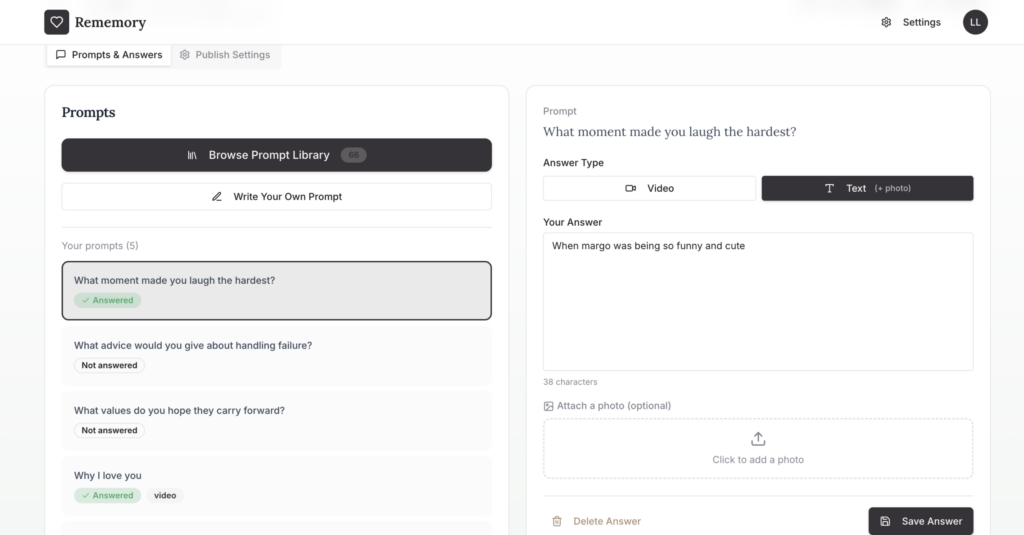
4) Answer heartfelt prompts for each individual
Inside every person’s capsule, you’ll find 50+ guided prompts designed to spark meaningful reflection.
These prompts help you share things people often wish they’d said, such as:
• Life advice
• Favorite memories
• Gratitude
• Personal stories
• Words of encouragement
You can respond to each prompt with text or video, and everything you record here is shared only with that specific individual.
You can complete as many or as few prompts as you like — there’s no pressure or minimum.
⸻
5) Set your publish (delivery) settings
Once you’ve created the content you want, you control when that capsule goes live.
Here’s what makes ReMemory unique:
• You enter the recipient’s email
• You create a private password
• You choose a future date when the password becomes usable
An email is sent to your loved one immediately, letting them know the capsule exists and giving them the password — but the password won’t work until the future date you selected.
This creates awareness without early access.
Most people set this date 2–5 years out, giving peace of mind that the content is protected until the right time.
⸻
6) Update anytime
Life changes — and your ReMemory can evolve with it.
You can always:
• Add new videos
• Update messages
• Answer more prompts
• Add new loved ones
Your legacy grows as your life does.
⸻
Pricing (built to be affordable)
Our mission is to keep ReMemory accessible and focused on covering storage and operating costs.
• Monthly: $3/month
• Yearly: $24/year
• Lifetime: $200 one-time
Lifetime access keeps your account active forever, which is why most users choose this option — but we offer flexible plans for every preference.